 Goafie
Track every flight
Add a flight by number or route. Goafie pulls the schedule, gate, and live status, and tallies your distance and time in the air.
Join thousands of pilots ✈️ and flight attendants 🧑✈️ using Goafie as their flight logbook and travel tracker: live updates on every trip, memorable stats, and beautiful recaps that are sleek to share.


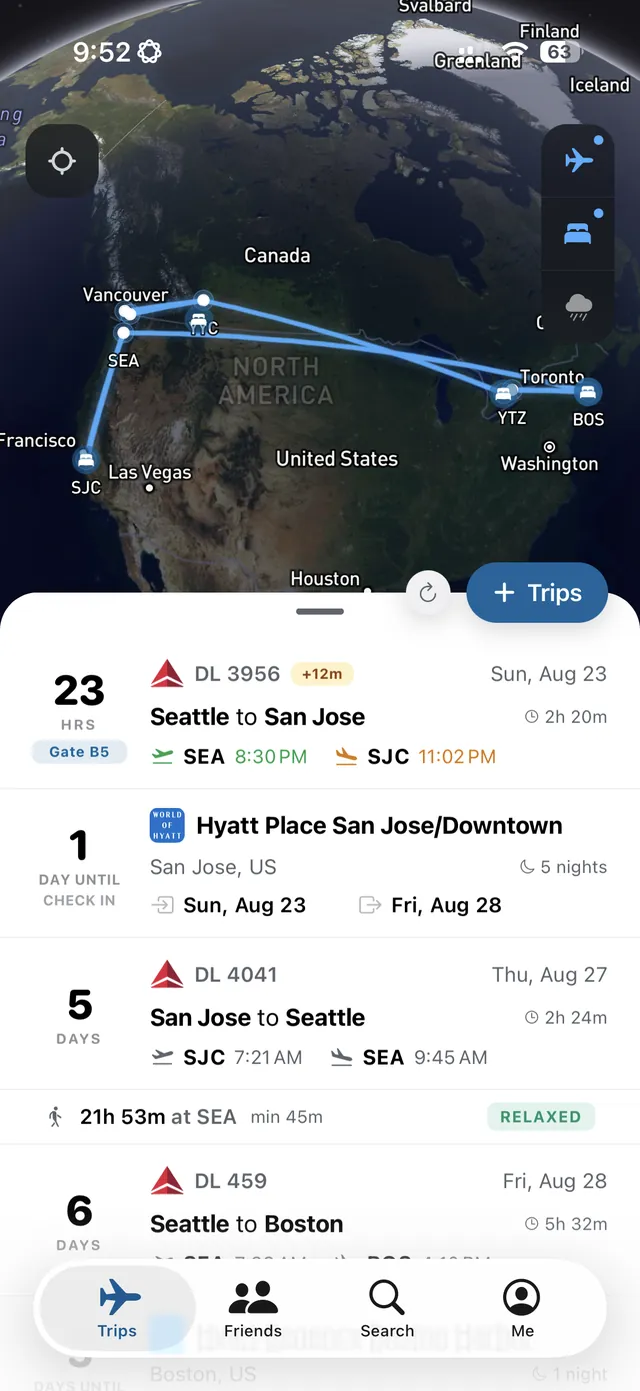


Every trip on one timeline
Add a trip once and Goafie keeps the schedule, the live status, and the stats. No spreadsheet, no forgotten flights.
Add a flight by number or route. Goafie pulls the schedule, gate, and live status, and tallies your distance and time in the air.
Save each hotel with your dates and confirmation. Nights and cities count toward your travel year alongside your flights.
Miles, flights, airports, and nights away add up automatically into a year in review you can share.
Score the airline you just flew and the airports you pass through, and see how other travelers rate security, food, and Wi‑Fi before you go.
Connect with other flyers, follow their upcoming trips, and control what you share down to a single flight or stay.
With Goafie Pro, a live flight card on your Lock Screen tracks gate, delay, and boarding from a few hours before departure until you land.
Five widgets for iPhone and Android put your next flight, your upcoming trips, the friends' trips you follow, your year in numbers and the weather where you're headed on your Home Screen. On iPhone they go on the Lock Screen too.
 AS 539
Next flight
AS 539
SEA → SJC
5:45 PM → 7:41 PM
Sun, Oct 25
in 2h 58m
AS 539
Next flight
AS 539
SEA → SJC
5:45 PM → 7:41 PM
Sun, Oct 25
in 2h 58m
 AS 1234
ACalexc
PDX → SEA
9:05 AM → 10:00 AM
Mon, Oct 26
Tomorrow
AS 1234
ACalexc
PDX → SEA
9:05 AM → 10:00 AM
Mon, Oct 26
Tomorrow

Every flight and stay feeds one shareable snapshot: miles flown, airports hit, and nights away.
Start free and log your next trips; sign in, and the next airline flight you add is tracked like Pro, free, once. Goafie Pro adds gate and delay alerts within minutes from 3 hours before departure on every flight, a live card on your Lock Screen, Calendar Sync, Home Screen widgets, and room for every trip you've ever taken.
$0
No credit card. No account needed to try it.
Yearly
$54.99 per year
About $4.58 a month. Save 8%
Monthly
$4.99 per month
1st Free Pro Flight. Sign in on the free plan and the next airline flight you add to your own trips gets Goafie Pro's flight features, free, once: live tracking about every 2–5 minutes from 3 hours before departure, the real flight path on the map, gate, delay and cancellation alerts within minutes, on-time odds, Ride Quality, the plane flying in for your flight, and the weather overlay. It lasts until the flight leaves your Trips, 6 hours after its scheduled arrival. It isn't a trial of Goafie Pro: Calendar Sync, unlimited and past trips, private trips, friends' trip alerts, widgets, and the Lock Screen card still need Pro. How it works
| Feature | Free | Goafie Pro |
|---|---|---|
| Upcoming flights and stays | Up to 10 at a time | Unlimited |
| New trips per day | 5 | Unlimited |
| Add past trips | Not included | Any date |
| Stats and year in review | Included | Included |
| Lock Screen card for your own flights | Not included | iPhone and Android 16+ |
| Home Screen and Lock Screen widgets | Preview with sample data | All 5 widgets |
| Flight updates | At key checkpoints | About every 2–5 minutes from 3 h before departure |
| Flight path on the map | Estimated after departure; at the airport after landing | Real path, updated about every minute near airports |
| Gate and delay alerts, last 3 h before departure | Up to ~30 min after a change | Within minutes |
| Pro tracking, alerts, on-time odds and Ride Quality on your own flights | The next airline flight you add, once, when signed in | Every flight |
| Friends and share links | Included | Included |
| Subscribe to friends' trips | Included | Included |
| Alerts and Lock Screen cards for friends' trips | Not included | Included |
| Calendar Sync | Not included | Import and export |
| Private trips | Not included | Included |
| Ride Quality (turbulence) | Not included | Live and forecast |
| Arrival forecast | Not included | On-time odds |
US prices on the App Store and Google Play; your store shows the price in your currency. Pro renews automatically. Cancel any time in your App Store or Google Play subscription settings, and Pro stays on until the end of the period you paid for.
Goafie is built by pilots and frequent flyers who have spent decades building software. About the team